
USFans Spreadsheet · Guides
USFans Spreadsheet Links: Keep the Item and the Selected Option Together
Identify the destination behind a USFans spreadsheet entry, retain the intended variant and distinguish product discovery from private order records.
A saved USFans spreadsheet link should let you return to an identifiable product. It does not necessarily preserve the option you selected or tell you whether you placed an order. Keep those three things separate: the destination, the intended variant and any purchase record.
Start from the USFans Spreadsheet collection when browsing. When you find a candidate, keep enough information to recognise it after following the link rather than relying entirely on the original thumbnail.
On this page
Understand which kind of destination you saved
Swipe sideways to compare all columns.
| Destination | What it helps you do | What it does not establish |
|---|---|---|
| Category or search page | Browse possible matches | That one result is the exact item you selected |
| Product page | Inspect a particular offer | That your preferred option is selected or available |
| Personal order page | Review a purchase in your account | That another person can safely use your private reference |
Do not replace a missing product destination with a broad search page and describe the original link as repaired. A search can help find a replacement, but the replacement needs its own comparison.
Follow a product reference without assuming the option
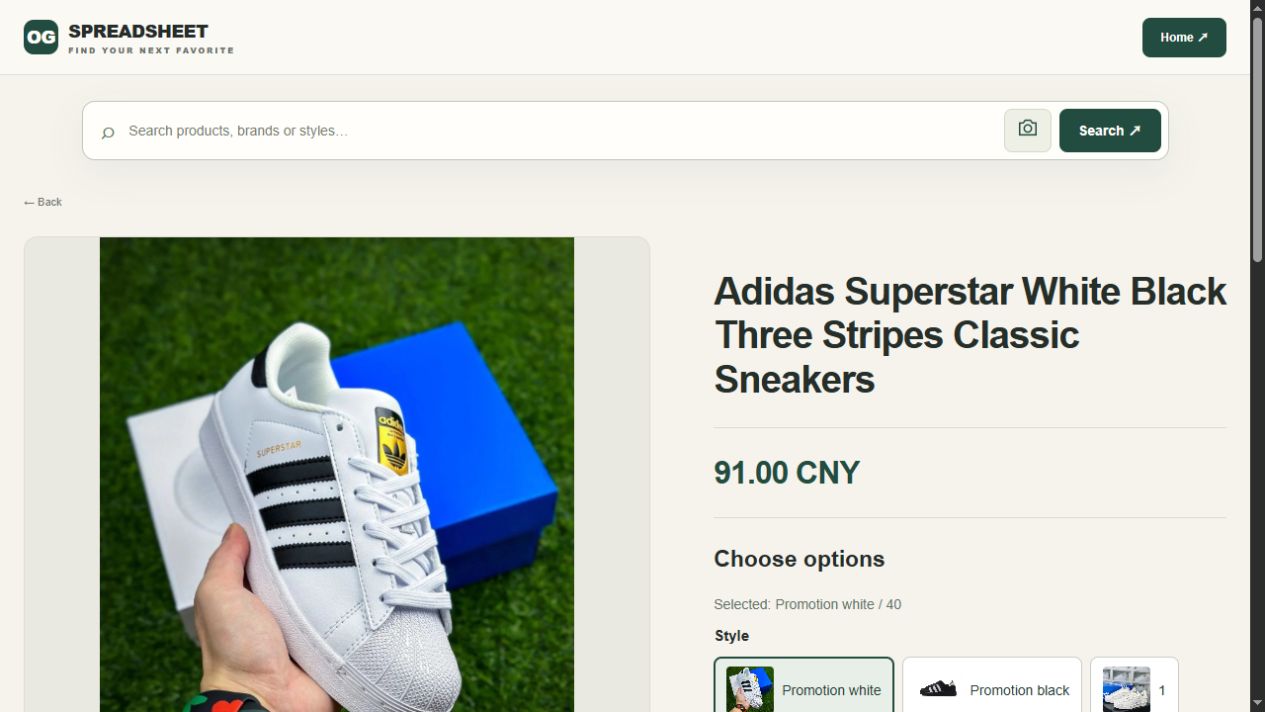
For a white-and-black Adidas Superstar candidate, keep the product name and your intended size beside the link. After moving to a purchase destination, compare its description and selector with those notes. A matching name does not establish that the saved size is available or selected.
Open the Adidas Superstar reference on OG to inspect the candidate. The button opens that fixed product page; it is not a search result tailored to your image or an account connection.
If the option you want is absent, do not treat reaching the page as having recovered that option. Keep the original selection distinct from any replacement you consider.
Preserve the choice when moving between pages
Suppose you want a particular colour and size. Write them beside the saved destination. When you reopen it, compare your note with the actual selector. A default option can differ from the choice you intended even when the product title matches.
If the offer includes a set or several pack sizes, record the quantity and included pieces as well. A price comparison is incomplete when one entry refers to a single item and another to a bundle.
For clothing, the size guide helps distinguish a label from the measurements needed for fit. The buying guide follows the later stages without treating the saved link as a completed order.
Check the final address without editing it blindly
Read the destination after navigation, especially when starting from a shortened address or copied message. A product name in a URL path is not proof of who operates the host. The website guide explains why identity and page purpose need to be checked together.
Keep the original address while investigating a problem. Do not randomly remove parts of it in the hope of making a destination work, then assume the result is equivalent. Some address details can affect what opens; the final item and option still need comparison.
Never share an address containing private account or session information as a public product link. Use the ordinary product reference for discovery and retain purchase details in your own account records.
What to do when the link no longer gives the expected result
Describe the result accurately. An unavailable item, a sign-in request and an empty screen are different observations. Check the expected destination and the message shown before deciding what to do next.
If another listing looks similar, retain it as a separate candidate. Compare the model, variant and useful details rather than silently changing the old row. The archive guide helps preserve the distinction between an older reference and a new alternative.
For a repeated loading issue, use the troubleshooting guide. Do not treat one failed product page as proof that the entire service is unavailable.
Recheck before the decision that depends on it
Before payment, inspect the offer and selected option again. After a purchase, use the actual order record for questions about what was ordered. At the warehouse stage, compare any relevant photos with that record using the QC guide.
A saved link remains useful for discovery, but it cannot establish a future price, delivery outcome or product property. The spreadsheet review and best-spreadsheet comparison help assess whether a collection makes these distinctions clear.
If an unexpected page requests account information, stop and check the context through the safety guide. The right link should help you make the next decision, not encourage you to skip it.
When a saved link opens the wrong colour or size
A working product link and a restored selection are different things. Before choosing an alternative, compare the current selector with the note you saved. Keep the original choice visible until you decide whether to replace it.
| What you see | What to do next |
|---|---|
| Same product, different default colour or size | Select the intended option again and compare its image, quantity and current amount before continuing |
| Intended option is no longer offered | Keep the old choice marked unavailable; record any alternative as a new choice rather than silently replacing it |
| Product title stays the same while the image changes | Check the option code and image together; the title alone cannot identify the selection |
| A sign-in page appears instead of product details | Check the destination through a known entry point; do not paste credentials into an unexpected page |
| The page is blank or repeatedly fails | Retain the original link and visible error, then use the loading checks before assuming the item has disappeared |
For the Adidas Superstar reference above, a saved size is only your intended choice. Reopening the page does not reserve it or confirm that it is still selectable. If you share the find, send the public product destination and intended colour/size in plain text—not a private order or session link.
Does copying a product URL save my selected variant?
Do not assume it does. Reopen the saved address and read the selector. Keep the variant in your notes even if it appears to persist, and verify it again before ordering. The archive guide explains how to keep older references separate from new alternatives.
USFans Link: Identify the Destination Before You Use It
A USFans link is useful only when you know what you expect it to open. A product reference, a collection, a search result and an account page serve different purposes. Before using a saved address, decide whether you are trying to find an item, recover a selected option or continue an existing order.
If you want product ideas, start with the USFans spreadsheet collection. If you already have an item in mind, keep its original address and identifying details together. Do not discard the starting reference merely because another page displays a similar picture.
Name the destination you need
For browsing, a category or search result can be a useful starting point. For comparing one candidate, you need a recognizable product page. For a question about an order you placed, you need the record belonging to that order, not just its public product link.
These destinations are not interchangeable. A search result containing the right-looking shoe does not prove that it represents the same offer you saved. Likewise, a product page is not evidence that an order has been placed, paid or shipped.
The spreadsheet-links guide focuses on keeping a shortlist organized. This page concerns the individual address you are about to use and how to recognize when the action has changed its meaning.
Preserve a small identity record
Keep the source address, product description and intended option in your private notes. If a seller or product identifier is visible, retain it as part of that reference rather than replacing it with a nickname you may not recognize later.
For example, inspect the white-and-black shoe listing on OG. Use the page to investigate that candidate; its presence does not establish current availability, fit or authenticity. If you move from a collection to a product destination, compare the product details before assuming your option travelled with you.
A useful note might say which color and size you were considering and what remains to be checked. It should not say “confirmed” unless you have actually confirmed the relevant detail. A recognizable photo is a starting clue, not a complete record of the offer.
Conversion, search and manual selection are different actions
Swipe sideways to compare all columns.
| Action | What you are trying to do | What still needs checking |
|---|---|---|
| Follow a product address | Open the referenced item | Model, offer and selected option |
| Use a link-conversion feature | Resolve a source reference in another supported interface | Whether the output preserves the intended product identity |
| Search by words or an image | Find possible matches | Whether any result is actually the same item |
| Select an option manually | Choose a particular variant | Whether it matches your original intention |
This distinction is not a promise that every source or conversion feature is supported. Check the actual result of the action available to you. Do not call a list of search matches a successful conversion merely because one thumbnail looks right.
If you have to choose the option again, treat that as a real selection step. Check color, size, quantity and whether the price concerns one piece or a set. The ordering guide connects that decision with later purchase stages.
When the opened page differs from the saved reference
Start with the visible difference. Is it a different product, an unexpected option, a missing page or an account prompt? Those observations suggest different next checks; they do not establish a single cause.
Check that the copied address is complete and has not picked up punctuation from a message. If the destination is unexpected, do not enter credentials just to see whether it becomes the product you wanted. Return through a known entry point and identify the action before proceeding. See the safety guide for the separation between product browsing and account access.
If you find an alternative item, keep it as a new candidate. Replacing the old reference silently makes it harder to understand which product later comments or measurements concern. Similarity does not restore the original offer or its earlier conditions.
A working page is not a completed transaction
Opening a product is one observation. Selecting an available option, placing an order, completing payment and receiving the item are additional stages. Do not let a successful first click stand in for all of them.
This matters when someone recommends a link as “working.” Ask what was actually checked. They may mean the page opened, not that they bought your intended variant. The review guide helps interpret those claims without turning a browsing observation into a purchase history.
Keep later evidence attached to the right item
Once you place an order, questions about a particular unit need the corresponding order information. A public product page can provide context, but another buyer's warehouse photo is not an inspection of your unit.
Use the QC guide when a visible detail needs clarification. If the question is now delivery cost, move to shipping guidance: a product URL cannot supply the weight, dimensions and conditions of a future packed parcel.
Sharing a reference without sharing your account
Share the public product reference and a description of the option when asking for help. Avoid sending account-access links, passwords, verification codes or screenshots containing addresses and payment details. A person comparing a product should not need access to your account.
If you cannot tell whether an address contains private account information, use the public product page instead of copying a private order screen's address. Send information needed to locate an actual order through the appropriate private support channel.
Frequently asked questions
Can I use a similar result when the original link stops opening?
You can investigate it as a new candidate. Check its identity and options again; do not describe it as the original item without that basis.
Does a converter preserve the size I selected?
Do not assume it does. Inspect the output and the current option fields before relying on the result. If the expected colour or size is absent, select it again only after confirming that the destination still represents the intended offer.
Should I delete the source after opening the new destination?
Keep it while you are comparing the item so you can trace a difference. A destination without its starting reference may be harder to reconcile later.
Where should I start if I only know the product category?
Return to the USFans collection. The best-spreadsheet guide helps evaluate whether a collection makes candidates easier to identify rather than merely presenting more links.
USFans Page: Choose the Destination That Matches Your Task
When you search for a USFans page, decide what you want to do before entering information. Reading about a product, installing an app, accessing an account and following a parcel are different tasks. A familiar name or image does not make those destinations interchangeable.
For product discovery, start with the USFans spreadsheet collection. For an existing purchase, use the account record belonging to that purchase rather than expecting a public collection to retrieve it.
Match the page to the action
Swipe sideways to compare all columns.
| Your task | The kind of page you need | Information it should not be confused with |
|---|---|---|
| Learn the buying stages | A reading guide | A live order or payment confirmation |
| Inspect a candidate | A specific product reference | Stock or fit confirmed for your chosen option |
| Consider an app installation | The app's store listing and details | A random file using a similar name |
| Manage a purchase | The relevant account record | Another person's screenshot |
| Understand a shipment | The matching parcel record | The original public product address |
The buying guide, account guide and tracking guide cover those separate questions. These articles explain decisions; they are not forms for accessing your private account.
A store listing has more identity than its icon
The Google Play listing observed on 30 September 2026 showed the app name USFans, the publisher label USFANS and package identifier com.usfans.mall. It displayed 28 September 2026 as its update date. Those details identify the listing observed; they do not establish a security audit or a successful purchase.
If you are comparing an app page with a link someone sent, compare the listing details instead of recognising only an icon. Do not infer that a separate download is the same application because its filename or artwork looks similar. The app-download guide keeps installation questions separate from shopping advice.
An update date belongs to that app listing. It does not date every product, price, policy or user review associated with the platform.
USFans logo: keep the image connected to its source
If your starting point is a saved icon or logo, keep the surrounding page context as well as the picture. An isolated crop removes details that help identify what you were viewing. A logo in a store listing, a screenshot of a product page and a group avatar serve different roles.
Swipe sideways to compare all columns.
| What you have | What to retain beside it | What the image alone cannot establish |
|---|---|---|
| An app icon | Listing name and publisher context | The identity of a separate download file |
| A website-header crop | The page address and date | That another page using the same art is controlled by the same party |
| A community avatar | The invitation source and group identity | Authority to manage your shopping account |
Compare the page identity before acting; do not decide whether to submit account details from visual similarity alone. An image file is also not an installation file. If your purpose is using the app, return to the app-download guide rather than treating a picture of its icon as a download source.
If you need a logo for publication, obtain the supplied artwork and establish its source and applicable permission. Keep a recreated graphic separate from the platform's original asset so that its appearance does not imply an origin it lacks.
A product destination does not log you into your order
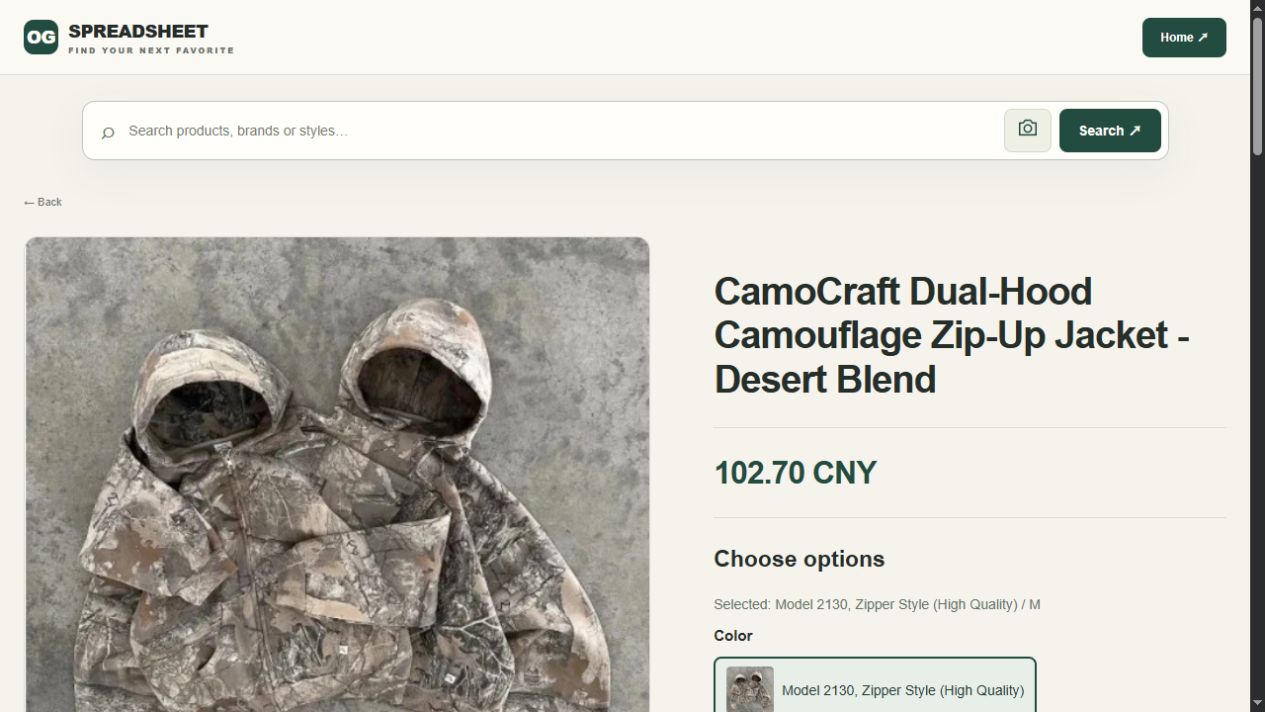
You can inspect the jacket candidate on OG when comparing products. That destination is a product reference, not the shipping record for a jacket someone has already bought.
Before relying on an opened product page, compare its description and selected option with your starting reference. A colour or size may need separate attention. If your question is about payment or an item already at a warehouse, return to the appropriate private record rather than searching for a similar public photo.
Keep a product shortlist separate from account information. A friend helping you choose an item generally needs the product reference and your question, not access to your account or delivery details.
When a page asks for something unexpected
Pause if an action does not match your purpose. For example, a page reached while reading a product description that unexpectedly asks for account credentials deserves a fresh destination check. Do not provide verification codes to a person who says they will complete the process for you.
Check the address actually opened, not just the words shown on the link. If you are unsure, return through an entry point you have independently established rather than following further instructions from the questionable page. The safety guide explains why product browsing and account access need separate checks.
This does not mean every sign-in prompt is malicious. It means that recognising an action and its destination should come before submitting sensitive information.
A page that opens is only the first step
A visible product page does not prove that a selected variant can be ordered. An order page does not establish that payment succeeded. A parcel number does not, on its own, establish carrier collection.
Use the record for the next stage you actually reached. The order-status guide helps separate stages, while support guidance helps turn an unclear screen into a specific question. Preserve the relevant message privately rather than replacing it with a guess about the whole service.
Common questions
Does the app name prove a page is safe?
No. Identify the destination and intended action. A recognisable name is not an account-security or product-quality finding.
Should I use a product page to find a parcel?
No. A product address and your shipment reference identify different things. Use the parcel record associated with your account.
Which page should I use just to compare finds?
Start with the collection or spreadsheet-links guide. Keep the product and option together before moving into any purchase stage.