
USFans Spreadsheet · Guides
Best USFans Spreadsheet: Compare What Happens After You Find an Item
Compare USFans collections using one shopping brief: finding, distinguishing, checking and reopening a candidate, with budget, category and mobile-use considerations.
The best USFans spreadsheet for a purchase is one that lets you reach a suitable item, understand the option and return to it without starting again. A long list can be useful, but its size does not tell you whether the entries are distinct, the links are usable or the details answer your question.
Compare collections by completing a small shopping task. Do not choose a winner from a homepage claim alone, and do not confuse the quality of a directory with the quality of every product it contains.
On this page
Use the same shopping brief in each collection
Write a short brief before opening alternatives. For example: a backpack for daily use, with enough information to check the dimensions and compartment layout. Keep that brief unchanged while browsing each collection. Otherwise you may reward one list for a more attractive but irrelevant product.
Find a plausible candidate, open its destination, identify the intended option and return to the list. Note where you had to guess or repeat work. This is a practical comparison you can perform, not a claim that we have tested every directory or ranked the market.
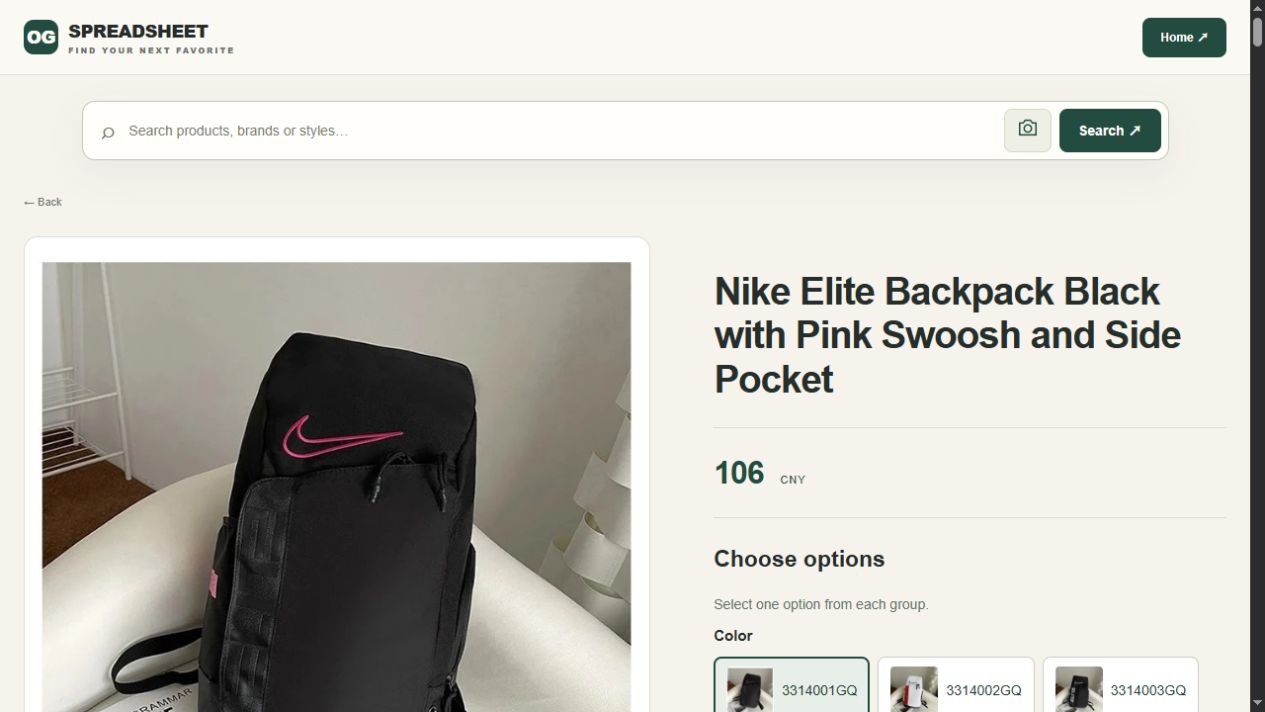
For a concrete product page to inspect, view the black-and-pink Nike Elite backpack on OG. Its appearance identifies a candidate; it does not establish internal capacity, dimensions or suitability for your belongings. Those details still need checking.
A bag title and a selected colour can disagree
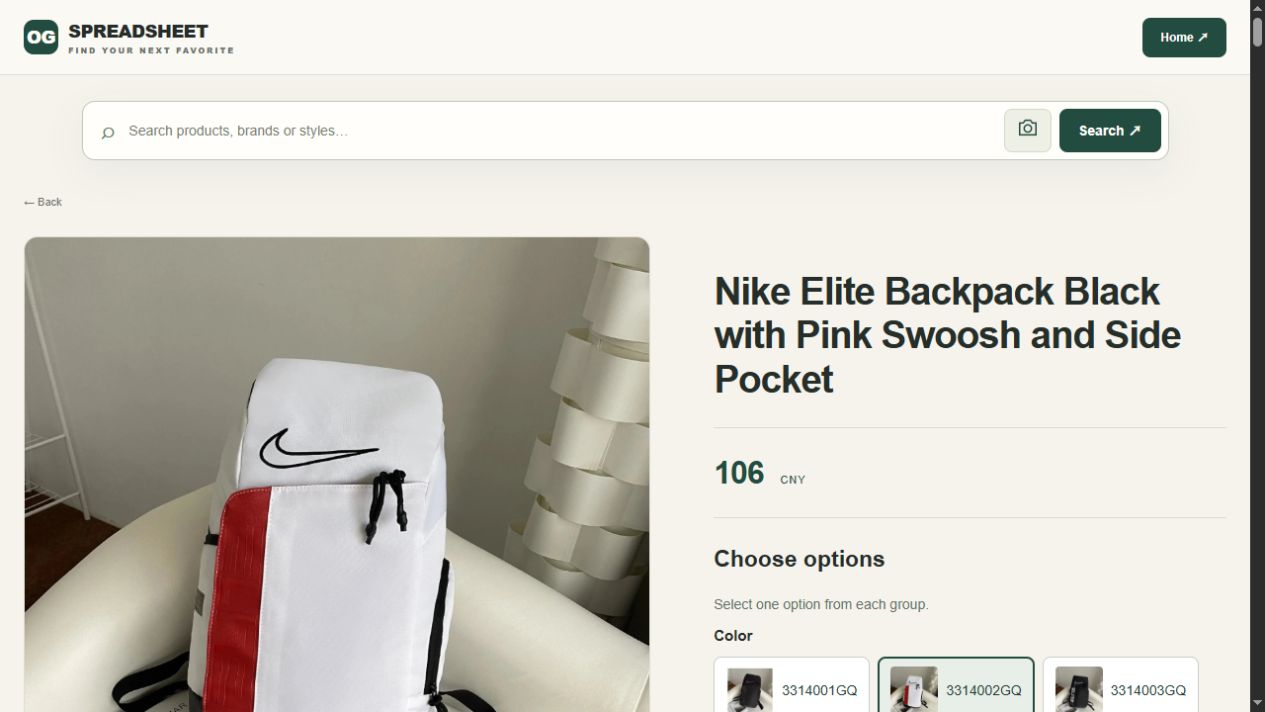
On 1 October 2026, the linked OG backpack page displayed 106 CNY with colour 3314001GQ selected and a black-and-pink bag shown. Switching to 3314002GQ changed the main image to a white-and-red bag, while the black-and-pink title and the displayed 106 CNY remained. The two screens compare colour choices only; they are not complete capacity selections or delivered-price quotes.
For a usable shortlist, save the selected code beside the product link and image. If you saved only the title, both colour choices could look like the same entry in your notes. Check the remaining option groups before comparing a final item amount, and ask separately for the internal dimensions needed for your belongings.
Compare four jobs rather than one score
Swipe sideways to compare all columns.
| Job | What a useful collection makes possible | A reason to look more closely |
|---|---|---|
| Find | Reach the relevant category without reading unrelated entries | A search or category label that does not narrow the choice |
| Distinguish | Tell similar models or versions apart | Repeated thumbnails with indistinguishable descriptions |
| Decide | Find the option and the detail needed for your use | A confident label with no supporting measurement or context |
| Return | Reopen the same candidate after viewing alternatives | Losing the destination or confusing the selected version |
A weakness in one job should remain visible. Adding the results into an arbitrary score can conceal a decisive problem: a beautiful collection is not useful for your purchase if its destination cannot be identified.
What a budget spreadsheet needs to preserve
A low displayed amount is meaningful only with its currency, quantity and option. Compare the same basis and keep transport separate. Do not rank a collection as cheaper because one entry shows a starting price while another describes a different configuration.
The shipping calculator guide addresses the parcel inputs that a product list cannot settle. If the amount needed to receive your purchase remains unknown, a low item price has not resolved the budget.
Check how the collection handles your category
For women's clothing, look for measurements and useful distinctions between cuts rather than assuming a label establishes fit. The women's shopping guide and size guide help define those questions.
For children's items, age labels alone are not enough to establish suitability. Identify the intended size, use and relevant product information before choosing. For electronics, a product image does not demonstrate compatibility or operation. The other-category guide provides a starting point for purchases that need different checks from ordinary clothing.
These requirements do not make specialised collections automatically better or worse. They determine whether the available information supports your actual decision. Do not assume that a general list covers a category well merely because it includes the category name.
Repeat the task on the device you will use
On a phone, check whether long labels remain understandable, options can be read and returning from a product preserves your place. On a larger screen, check whether comparisons remain clear rather than spreading the relevant fields too far apart.
If you lose your selection, retain the product destination and intended option in your own notes. A feature advertised by a directory should be judged by what it actually does in your session, not by its label. Repeat the relevant steps when an option or destination changes.
Do not confuse a QC reference with a product guarantee
A useful image should match the item and explain what was observed. An unrelated photograph or a broad quality badge adds little to the decision. Even a relevant warehouse image has limits: it may show a label or visible condition without establishing long-term performance.
Read the QC guide before treating an image as an answer. For the collection itself, the review guide distinguishes browsing usability from purchase and delivery outcomes.
Make a specific choice, not a universal claim
Choose the collection that helps you complete your brief with the fewest important unanswered questions. Keep those questions explicit rather than awarding a perfect score. Test more than one relevant entry before extending your conclusion to a whole category.
Start browsing from USFans Spreadsheet, use the links guide to check destinations, and follow the buying guide when moving beyond discovery. Account decisions belong with the safety guide. A good collection supports all these steps without pretending that one successful click completes them.
A comparison sheet for your own shortlist
Use one row per collection and the same product brief in each. Record what you could actually confirm rather than a star rating. For the backpack example above, keep the colour code and capacity question separate: an unchanged title or price is not evidence that the selected bag is unchanged.
Swipe sideways to compare all columns.
| Check | Note to keep | When the comparison is incomplete |
|---|---|---|
| Relevant choice | The category, exact product link and intended use | The collection only supplies a broad result page |
| Selected version | Colour code, size or capacity, quantity and matching image | A required option is unselected or the image disagrees |
| Information for your use | Dimensions or another specification you need | The conclusion depends on a photo alone |
| Cost basis | Currency, selected configuration and charges included | One amount is a starting price and the other a different option |
| Return visit | Whether the saved link reopens the candidate you noted | You must guess which similar item you originally chose |
A blank field is a question to resolve, not a zero to hide inside an average. If two collections reach the same product, compare the clarity and usefulness of their guidance; that overlap is not two independent confirmations of product quality. Keep the selected option with its link, then use the buying guide for the purchase steps.