
USFans Spreadsheet · Guides
USFans Spreadsheet Archive: Revisit a Saved Find Without Losing Its History
Organise older USFans product links, separate historical observations from current options and compare replacements without silently changing the original find.
An old spreadsheet row can help you remember a product even when its destination has changed. The useful approach is to preserve what the row originally described, then check what the link offers now. Do not overwrite the old entry with a similar product and assume you have recovered the same find.
This guide explains how to organise your own saved collection. It is not a downloadable historical USFans database. For current browsing, start with the USFans spreadsheet collection; for destination checks, use the links guide.
On this page
Separate three dates
A year in a spreadsheet title does not date every product inside it. Keep these dates distinct when they are available:
- When the collection or document was created.
- When you saved the particular item.
- When you last checked that item's destination and options.
If you only know the collection's title, do not invent a last-checked date for its rows. A later edit to a heading also does not establish that every product, price or option was reviewed again.
Keep the identifying details, not just the thumbnail
Preserve the original destination, a short description and the size or version you intended to investigate. Where your notes include a price, keep its date and currency with it rather than presenting it as a current offer.
You can organise the record like this:
| Field | Why it helps |
|---|---|
| Original product destination | Preserves which offer you first saved |
| Intended option | Distinguishes variants that may share a thumbnail |
| Saved date | Separates an older observation from a new one |
| Current check result | Records what you can see now without rewriting the past |
| Possible alternative | Keeps a replacement separate until it has been compared |
Keep private order and payment information outside the shareable collection. If the product was purchased, the order-status guide explains why its transaction record should remain separate from a saved link.
Give different failures different meanings
An unavailable product, a page asking for login and a page that failed to load are not the same observation. Describe the result you actually encountered before deciding that the product is gone.
If a listing opens but no longer shows the desired option, record that option problem. If the destination resolves to another product, do not treat the successful page load as proof that your original row is valid. Compare the description and selectable details with your notes.
Avoid changing fragments of an unfamiliar product URL until something opens. A working destination produced that way may identify a different item. Preserve the original and investigate any new candidate on its own terms.
How to handle a possible replacement
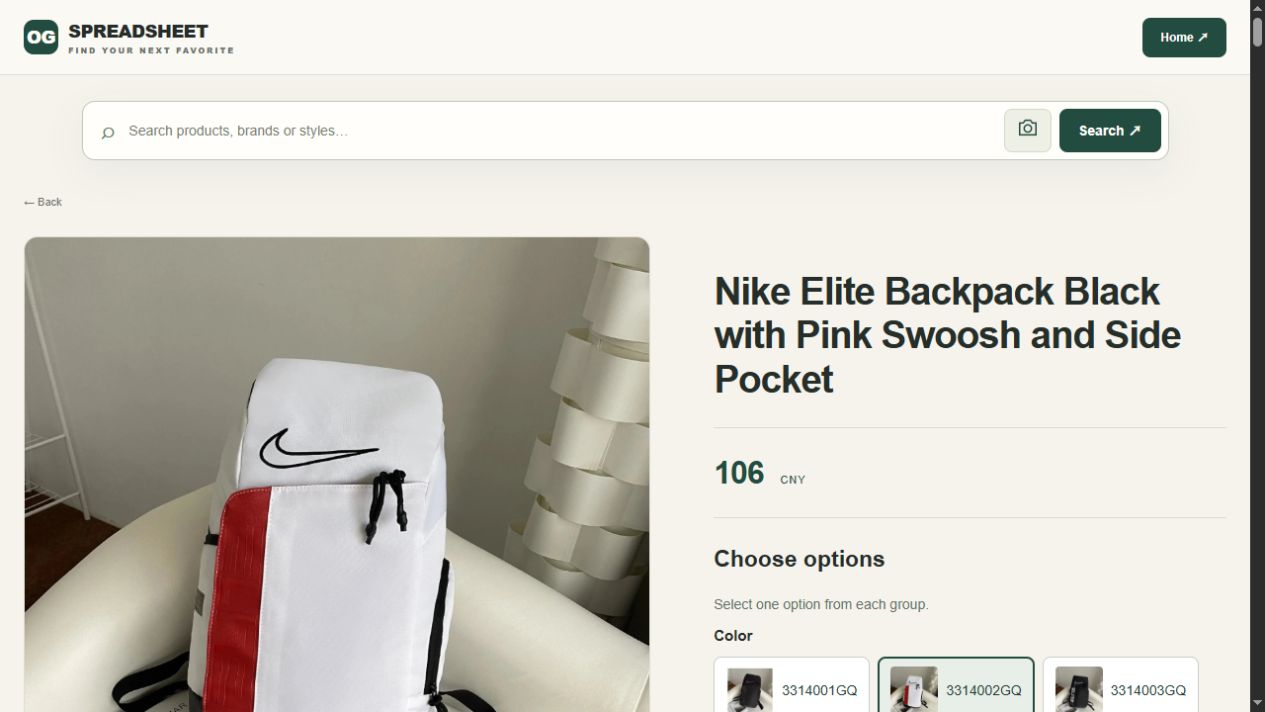
Suppose you saved a black backpack months ago and now find a similar black-and-pink design. Similar appearance does not establish the same model, dimensions, option or seller. Compare the features that made the old item useful to you before calling the new one a replacement.
Inspect the Nike Elite black-and-pink backpack candidate on OG as a new product to investigate. This example does not claim that it replaces a particular archived listing or that its current specifications match an earlier purchase.
A title can remain while the colour view differs
The saved 30 September 2026 heading describes black and pink. In the 1 October colour check, 3314002GQ displayed white and red without changing that heading. If colour was the reason you saved the old bag, record the newer option and compare its picture directly. The displayed 106 CNY was a colour-only state with the capacity group still unselected.
If the candidate is suitable, add it as a new entry linked to your old note in your own records. Keep the reason for the change clear: a different available option, a different design or simply a new alternative worth checking. The best-spreadsheet guide discusses comparing collections without treating their size as a quality guarantee.
Deduplicate carefully
Two rows with similar names are not necessarily duplicates. Check the product destination and intended option before combining them. Conversely, the same product may appear more than once under different captions.
If you merge duplicate notes, retain useful context such as the option you considered and the date of an earlier observation. Do not combine a public QC image with your own purchase record just because the product looks similar. The QC guide explains why item and order identity matter.
For a large collection, begin with the items you still intend to use. Rechecking every old row is less urgent than establishing whether the few products on your current shortlist are identifiable and suitable. This is a personal organisation method, not evidence that unchecked entries remain valid.
Before ordering from an older entry
Recheck the current option, amount and relevant product details. If a saved measurement influenced the choice, confirm that it belongs to the offer now being considered. Old shipping information should not stand in for a current parcel proposal.
Then follow the ordering guide rather than treating the archive as a checkout record. A historical photo or price can explain your earlier interest, but it cannot guarantee present availability or the terms of a new transaction.
Frequently asked questions
Does a newer year in the title make a spreadsheet better?
Not by itself. Check whether the entries you need have usable destinations and enough current detail to support your decision.
Can I keep unavailable products in my collection?
Yes, as historical notes. Keep them visibly separate from candidates you have recently checked so that you do not mistake a memory aid for a current offer.
Can an archived QC photo prove the quality of a new order?
No. It may show a particular item at an earlier time. It does not inspect the goods purchased for a later order.
Should I delete the original URL when I find an alternative?
Preserve it if it helps explain the history of your choice. Store the alternative separately and compare it before using it for a new purchase.
USFans Spreadsheet 2025: Recover a Saved Find Without Confusing Old and New
If you saved a USFans spreadsheet in 2025, the most useful detail may be a product reference you cannot now identify. Start by recovering that reference, not by assuming that a collection with a newer year contains the same offer. This guide helps you investigate an older entry; it is not a preserved copy of a particular 2025 spreadsheet.
For browsing rather than recovering an old find, use the USFans spreadsheet collection. The archive guide explains what an older record can and cannot establish.
First decide what you are trying to recover
An old screenshot, a bookmarked collection and an actual order record contain different information. Use the strongest starting point you still have.
Swipe sideways to compare all columns.
| What you saved | Useful information to retain | What it does not establish now |
|---|---|---|
| A product address | Full address, visible identifier and the option you meant | Current stock or unchanged terms |
| A spreadsheet row | Product description, destination and any dated note | That the linked page still represents the same offer |
| A screenshot | Visible product details and its original context | A working destination or the identity of a seller not shown |
| Your own order record | The item and variant actually ordered | Availability for a new purchase |
Keep your original reference intact while investigating. If you find a replacement, save it separately. Otherwise, a later comparison can accidentally attach an old size observation or comment to a new product.
Follow the reference, not just the photograph
Open a saved public product address and compare its identifying details with what you retained. A matching general description is weaker than a matching product identifier and option. If the page now shows another item, record that difference rather than treating the address alone as proof of continuity.
With only a screenshot, list the visible clues: the product type, design details and any legible identifier. A similar image is a candidate to investigate, not a recovered original. Read the individual-link guide when a destination changes meaning or fails to open.
Do not enter account details into an unfamiliar page merely because it claims to restore an older collection. A public product search should stay separate from access to your private orders; the safety guide covers that distinction.
A replacement is a new comparison
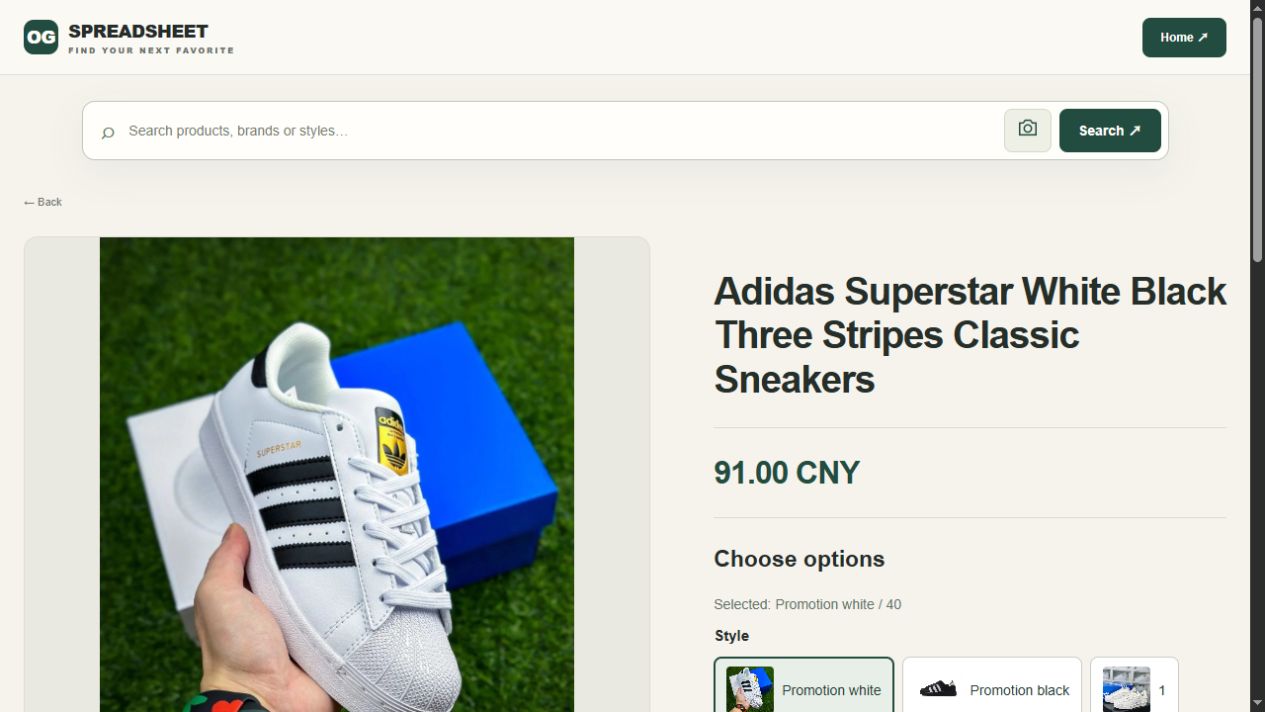
Suppose you saved a white-and-black shoe in an older list but cannot recover the offer. You could inspect the white-and-black shoe candidate on OG as a new starting point. This example does not identify it as an item from a 2025 collection or as the product you previously saved.
Preserve the newer shoe choice as a separate record
The shoe view captured on 1 October 2026 had Promotion white / 40 selected and displayed 91.00 CNY, with a white-and-black catalogue shoe above a blue box. Keep 40 as the page's size label; no foot length or international size conversion was established. None of those newer fields identifies the shoe from an otherwise incomplete 2025 reference.
Compare the current candidate's description, option and available size information afresh. Do not carry over an old price, another item's measurement or a previous buyer's QC assessment. The shoe guide and size guide help frame the new comparison.
Your personal note can distinguish three outcomes: the original reference was recovered; a different candidate was found; or the identity remains unresolved. Keeping those outcomes separate is more useful than marking every similar picture as a successful match.
Treat old prices and photos as dated observations
A price visible in a 2025 image concerns the context shown there. It may omit an option, quantity, currency or later charges. It is not a present quotation. Equally, the year in a collection title does not tell you when each row was checked.
An older warehouse photo can help you recognise a visible feature, but it depicts the unit photographed. It cannot establish the condition of a future order. Use QC guidance to decide what you would need to examine for your own item.
Shipping needs a separate decision. Even recovering the exact product does not recover a current route, packed parcel or delivered cost. Consult shipping guidance rather than extending an old parcel example to a new purchase.
When to stop searching the old list
If you cannot connect the saved image or description to a specific offer, keep it as inspiration rather than a verified product reference. You can then build a new shortlist around the features you actually wanted.
The best-spreadsheet guide helps assess a collection's usefulness, while the spreadsheet-links guide helps preserve better references next time. Neither a larger list nor a more recent title resolves an unidentified old item by itself.
Questions about a 2025 spreadsheet
Can I download the original collection here?
This page does not provide a historical spreadsheet download. It offers a recovery method and links to the reading collection. Do not mistake the guide for a copy of the file you originally used.
Is an old link useless if it still opens?
Not necessarily. It may still be a useful reference, but examine the actual destination and option before relying on it for a new choice.
Can I combine old and new entries in my own sheet?
Yes, provided you keep their dates and identities clear. Separate an old observation from a newly checked detail instead of giving the entire sheet one misleading freshness label.