
USFans Spreadsheet · Guides
USFans Order Status: Read the Record Behind the Label
Distinguish USFans purchase, payment and parcel records, interpret dispatch in context and prepare focused enquiries about mismatched or unchanged statuses.
Before interpreting a USFans status, identify what the record describes. A product purchase, a payment and an international parcel may belong to the same shopping journey without showing the same progress. Reading one as another can make a normal intermediate stage look like a missing shipment.
Keep the identifier, latest event and event time together. The useful question is “What happened to this particular item or parcel?” rather than “Why does the whole account still look unfinished?”
On this page
Separate three records
Swipe sideways to compare all columns.
| Record | What to check | What it does not establish by itself |
|---|---|---|
| Product purchase | Item, selected option, quantity and purchase progress | That an international parcel has been submitted |
| Payment | Amount, currency, transaction reference and the associated purchase or service | That the seller has dispatched the item |
| Parcel | Included items, destination and transport events | That every item in your account is inside it |
USFans' shopping-agent instructions describe purchasing goods and domestic delivery before the later international parcel stage. This is why a purchase update cannot automatically be interpreted as movement towards your home address. The ordering guide explains that sequence.
Read “shipped” in context
When a record refers to dispatch, look for the journey it describes. Is the item moving from the seller towards the warehouse, or is a parcel being sent internationally? Do not decide from the word alone.
Look at the associated reference and event details. If you cannot establish the stage, ask support which shipment the update concerns. The warehouse guide covers arrival and item review; the tracking guide concerns following a parcel's transport record.
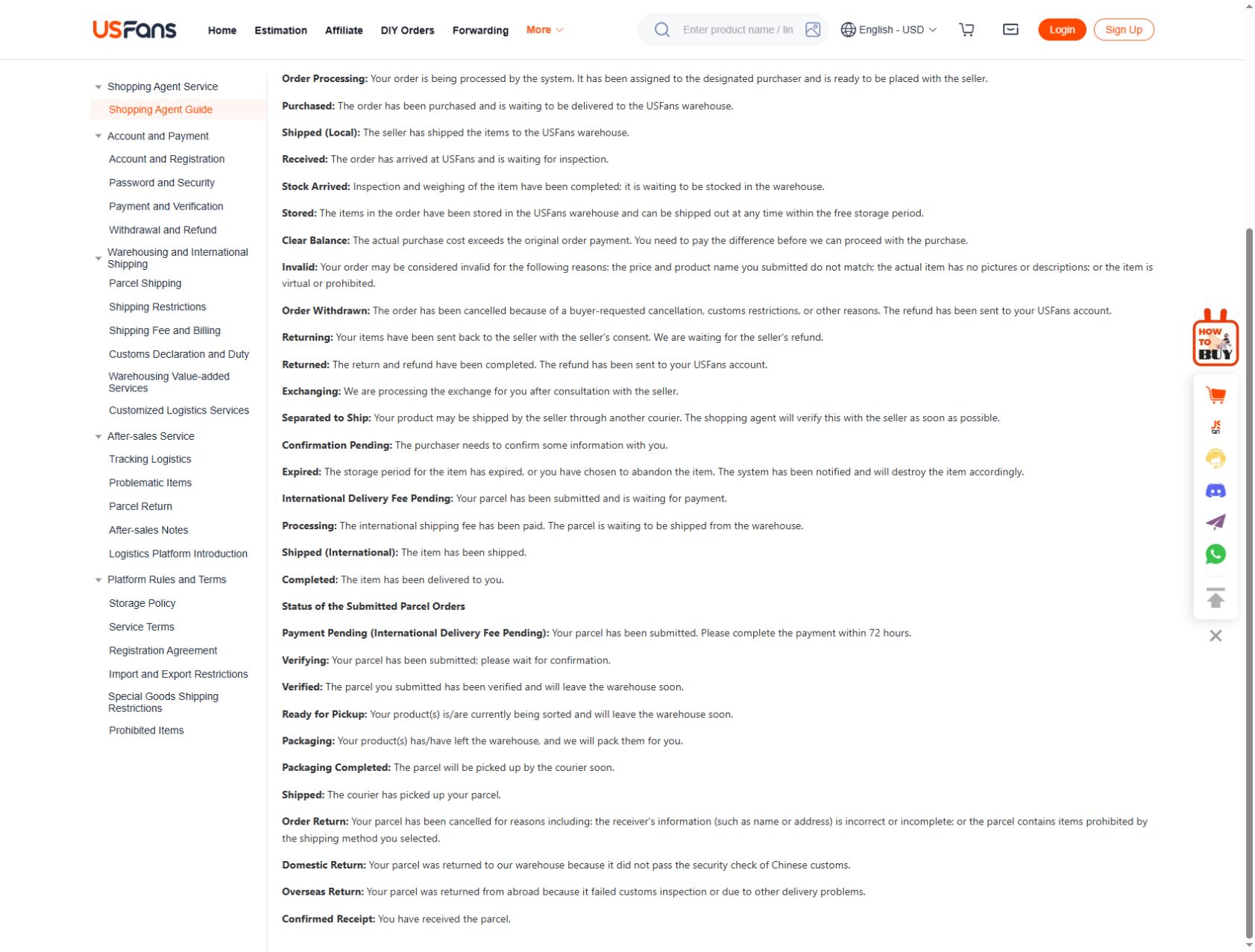
The English status definitions checked on 30 September 2026 distinguish several intermediate stages:
| Detail in the record | What it tells you |
|---|---|
| Arrival before inspection | The item has arrived; inspection is still a separate stage |
| Inspected and weighed before storage | Those checks have progressed, but storage status is distinct |
| Warehoused | The item is recorded in storage |
| Packaging Completed for a parcel | Packing is complete; courier collection is not established by that label |
| Shipped for a parcel | The described parcel stage follows courier pickup |
Check the English label beside an automatic translation when stages appear to collapse into the same word. A seller's domestic dispatch still concerns a different journey from the parcel stages above.
When a payment and order appear inconsistent
If you have a payment notification but cannot identify the corresponding order state, retain the transaction reference and amount. Check that you are inspecting the intended account and purchase before making another attempt.
Do not treat an unclear display as proof that no money moved, or a payment receipt as proof that goods were bought successfully. Ask for reconciliation of the specific records. The payment troubleshooting guide discusses keeping those questions separate.
If you later receive an updated status, compare its event time with the earlier record. A recently opened page can still contain an older event; the time you viewed it is not necessarily the time the action occurred.
When only part of an order is ready
Suppose your private shortlist contains trousers, a top and a cap. The top's record shows warehouse arrival, the trousers require a clarification and the cap is still awaiting a purchase update. These hypothetical states need separate follow-up questions.
Do not infer that all three are ready because one photo set has appeared. Match each record to its selected option, then decide what belongs in the parcel proposal. Read the QC guide if a photograph is the detail preventing your decision.
If you are still browsing rather than checking an existing order, inspect the black TNF cap candidate on OG. A product listing is not an order-status lookup and does not display your private transaction. Keep new finds in a separate shortlist from purchases already placed.
A change request is not a completed change
After requesting a cancellation, option change or return, keep the request and the response together. Check whether the record shows that the request was received, approved or completed; do not assume those are the same event.
Likewise, do not assume that an approved remedy establishes where or when funds have been returned. Follow the actual response and the relevant transaction information. Consult returns guidance before relying on a particular process being available for the item's stage.
Prepare an enquiry that can be answered
Send support the necessary identifiers privately and describe one inconsistency at a time. A useful enquiry contains:
- The item or parcel you are asking about.
- The exact latest status and its displayed date.
- The related transaction or request, if relevant.
- The specific point you need clarified.
For example, ask whether a dispatch event concerns the journey to the warehouse or the international parcel. That is more precise than asking why “shipping is wrong.” Avoid posting full account screens or shipping labels publicly; crop unrelated personal information if an image is needed.
The support guide explains how to organise a follow-up. The delivery-time guide helps determine which starting point applies when your question concerns elapsed time.
Frequently asked questions
Does a saved product mean an order exists?
No. A saved link records a candidate. Confirm purchases using the relevant account record, not the presence of the item in a spreadsheet.
Does an unchanged status mean the parcel is lost?
An unchanged display alone cannot establish that conclusion. Identify the last event, current stage and any specific action requested before deciding how to follow up.
Can I use another buyer's status screenshot as a guide?
It may help explain a layout, but it does not establish your order's state. Account versions, translations and transaction stages can differ.
Where should I return to browse products?
Use the USFans spreadsheet collection for browsing and the links guide to keep candidate URLs organised. Neither replaces the private purchase record.